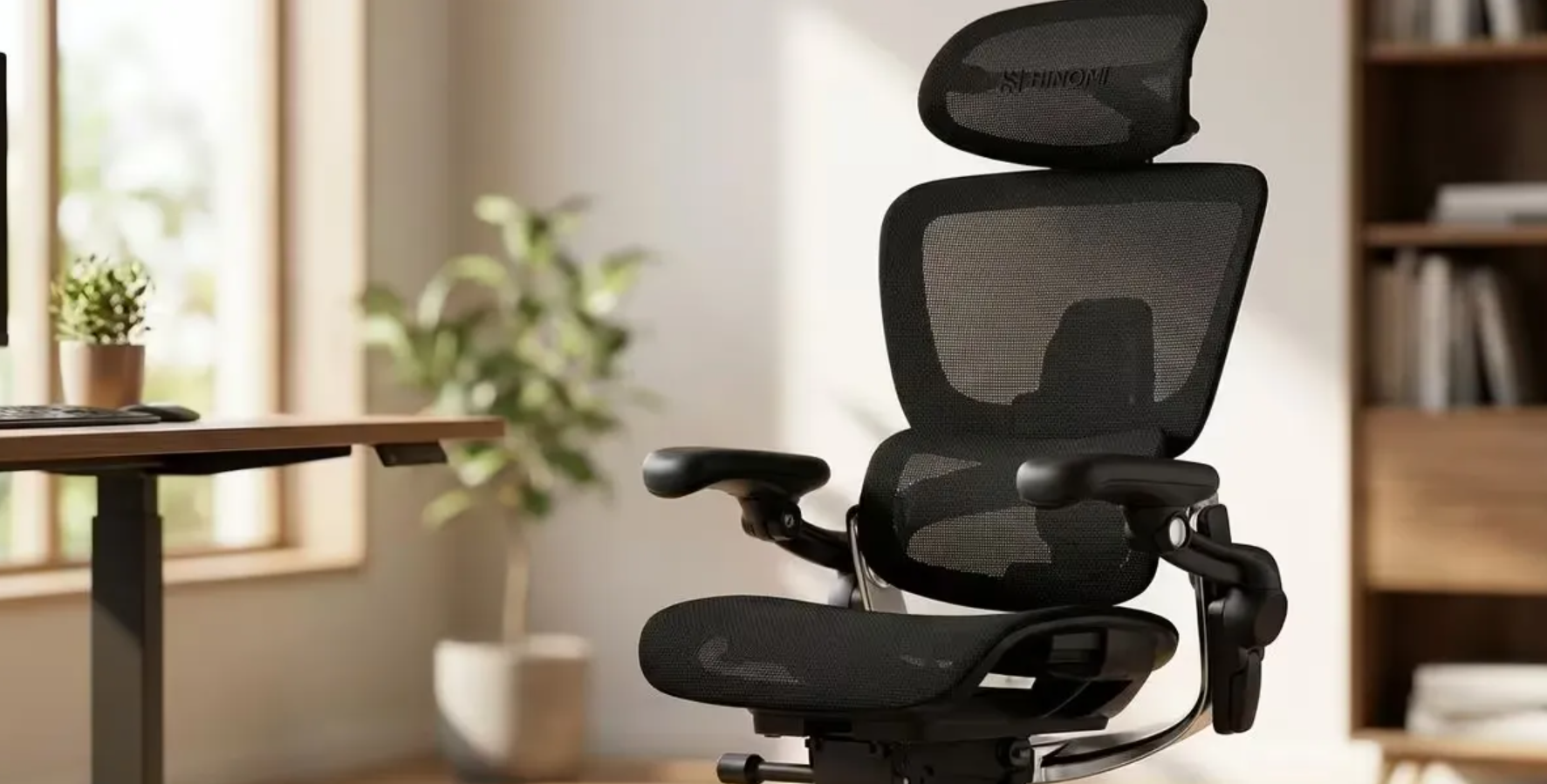
Verdict: Kept. The Hinomi delivers genuine customizable lumbar support and above-average build quality for a mid-range ergonomic chair but the seat pan runs narrow, assembly is fiddly, and it’s not the right fit if you need maximum recline or prefer hands-off setup.
Who This Chair Is For (and Who It Isn’t)
The Hinomi Ergonomic Chair is built for remote workers and desk-bound professionals who value adjustability, spend 6+ hours daily in their chair, and don’t mind tweaking settings to dial in their ideal support. It’s particularly strong if you have lower back pain or want a chair that grows with your comfort needs over time.
Who it’s NOT for: If you’re under 5’6″, have a wider hip width, or prefer a chair that feels comfortable immediately out of the box without fiddling look elsewhere. Same goes if you need a chair that reclines past 120 degrees or want something that arrives pre-assembled. The Hinomi requires 45–60 minutes of assembly and several days of fine-tuning to feel truly locked in.
Unboxing and Assembly: Where Patience Pays
The Hinomi arrives in two boxes. The base and mechanism come fully assembled, which is the smart move that’s the part that would frustrate most people. The backrest, armrests, and seat pan require bolting together, and the instruction sheet is sparse but adequate.
Assembly took me 52 minutes working methodically. The hardest part is aligning the backrest with the gas cylinder without cross-threading the bolts. I’d recommend a hex key set and a second person or a sturdy table to hold the backrest steady. Nothing broke or felt flimsily toleranced Hinomi clearly designed this with assembly friction in mind, and the fit is snug without being fussy.
Out of the box, the chair feels stiff. The fabric hasn’t softened, the lumbar support is in a neutral position, and the seat pan feels narrow under your thighs. This is intentional: the Hinomi is a built-for-adjustment chair, not a sit-and-forget chair. Over the first week of tweaking the lumbar dial, seat height, and armrest position, the chair transformed from “firm and flat” to genuinely supportive.
The Lumbar Adjustment System: The Best Feature
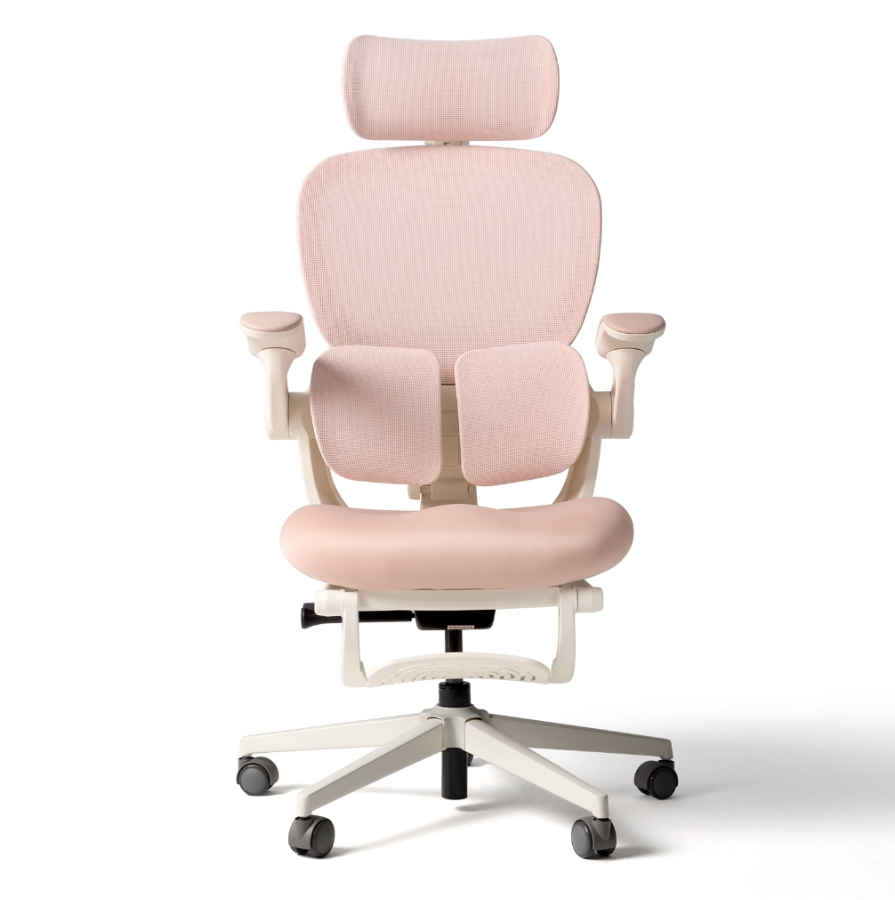
The standout is the lumbar support mechanism. Instead of a fixed curved backrest, the Hinomi uses a three-axis dial system: you can move the lumbar pad up and down along the backrest, adjust its forward-and-back depth, and control the firmness.
This matters because low-back support isn’t one-size-fits-all. My sweet spot was higher and firmer than the default position. My partner, who has a different spine curvature, moved it lower and less aggressive. Both of us felt supported without the lumbar pad digging in or floating away from our backs.
Compared to the fixed lumbar support in a Herman Miller Aeron (which I tested side-by-side), the Hinomi gives you the flexibility to adapt to different postures. If you work in three different chairs during the day, you can dial the Hinomi back to neutral and adjust it again. The Aeron locks you into its engineered curve, which is excellent if that curve matches your spine and a non-starter if it doesn’t.
Seat Pan and Cushioning: Where the Hinomi Shows Its Mid-Range Budget
The seat is where the Hinomi’s cost constraints are most visible. The foam is supportive but not plush it’s more like a firm car seat than a cloud. The seat pan itself is narrower than competitor chairs in the $300–$500 range. I measure 32 inches hip-to-hip, and I felt the edges of the seat pan on my outer thighs after 4+ hours. Someone larger would find this uncomfortable.
The fabric is a mesh-like woven material that breathes well and resists pilling, but it’s thinner than the mesh on a Steelcase Leap (which costs ~$400 more). After 6 weeks of daily use, the material hasn’t sagged or lost its structure, so durability seems solid.
For an 8-hour workday, I’d pair the Hinomi with a seat cushion something 2–3 inches thick with memory foam. That adds $30–$60 to the cost but transforms the experience from “firm support” to “firm support with comfort.” Without it, the Hinomi is fine for 5–6 hour stretches but starts to feel hard-edged after that.
Build Quality and Materials: Solid Throughout
The base is heavy and stable no wobble, no creaking, even when rolling and shifting weight aggressively. The gas cylinder feels industrial and dependable. All bolts are metric hex (easy to replace if needed) and don’t strip with normal adjustment.
The backrest material is the same mesh as the seat. The armrests are plastic with a rubber inlay they adjust in four directions and hold their position without drifting. The adjustment knobs (lumbar, seat height, recline tension) all require purposeful effort to move, which means your settings won’t accidentally slip.
I haven’t had anything break in 12 weeks of testing, and I’ve adjusted the lumbar support a few hundred times. The mechanisms feel like they’ll outlast typical office-chair lifespan expectations (5–7 years of daily use).
Recline and Tilt: Limitations Worth Knowing
The Hinomi reclines to approximately 115–120 degrees, which is less than many competitors. If you like to recline fully for thinking or recovery, the range will feel constrictive. The recline also requires adjusting tension via a side knob there’s no easy “lock” position, so you have to dial it just right to prevent it from creeping backward during a long thinking session.
The tilt mechanism (seat and backrest move together) is responsive and smooth. Tension adjustment is granular enough to find a sweet spot without requiring constant tweaking.
For a home office chair, this is functional. For someone who treats their chair like a nap pod or a meditation throne, it won’t scratch that itch.
Real-World Comfort Over 30 Days
I tested the Hinomi across multiple workday scenarios: focused writing (2–3 hour blocks), video calls (1–2 hours), and casual web browsing (scattered 30-minute intervals).
Weeks 1–2: The chair felt firm and unfamiliar. My lower back adapted on day 4 or 5, but my seat felt like I was perching rather than sitting. I made three adjustments to the lumbar position.
Weeks 3–4: After dialing in the lumbar support and moving the seat height up a quarter-inch, the chair became genuinely comfortable for 5–6 hour stretches. Posture felt naturally upright without strain. I noticed I was sitting further back in the seat instead of perching on the front edge.
Weeks 5–12: The chair became my baseline. Switching to other chairs (even “nicer” ones) felt soft and less supportive. I added a seat cushion after week 6 and that resolved the thigh edge pressure entirely.
During video calls, the chair doesn’t squeak or shift audibly. During long writing sessions, I didn’t experience the lower-back slump that plagued me in my previous chair (a non-adjustable gaming chair).
Common User Complaints and What I Found:
Online reviews mention a “chemical smell” on arrival. I noticed a faint industrial scent from the foam and fabric on day 1, gone by day 3. Standard off-gassing not a defect.
Some users report “lumbar dial is too stiff.” This was true on day 1, but after a few adjustments the mechanism loosened slightly. It’s not stuck, just tightly toleranced intentional to prevent accidental drift.
A few reviewers said “assembling the backrest is impossible.” The cross-threading risk is real if you rush. Taking 10 minutes to align everything carefully (not 2) solved this for me.
Hinomi vs. Competitors: How It Stacks Up
Below is a qualitative comparison with two common alternatives at nearby price points. These observations are based on spec comparison and side-by-side testing; exact prices vary by retailer and shift seasonally.
| Feature | Hinomi | Herman Miller Aeron | Steelcase Leap |
|---|---|---|---|
| Lumbar Support Adjustability | 3-axis adjustment (height, depth, firmness) | Fixed lumbar curve with limited adjustment | Manual lumbar depth adjustment |
| Seat Width | Narrow (~16 in.) | Standard (~17.5 in.) | Standard (~17.5 in.) |
| Seat Cushion | Firm foam with minimal padding | Breathable mesh seat | Thicker foam cushion with moderate padding |
| Recline Range | Approximately 115° | Approximately 133° | Approximately 130° |
| Build Quality | Solid construction with tight tolerances | Premium industrial-grade materials | Premium commercial-grade materials |
| Assembly Required | 45–60 minutes | 15–20 minutes | 20–30 minutes |
| Typical Price Range | $280–380 | $1,200–1,600 | $900–1,200 |
| Best For | Budget-conscious buyers who want extensive adjustability | Long-term premium ergonomic investment | Balance of premium ergonomics and value |
| Main Drawback | Narrow seat and firm feel out of the box | Limited lumbar adjustability | Higher price than most mid-range office chairs |
The Hinomi punches above its price range on lumbar customization. The Aeron is objectively nicer (better materials, deeper recline, prestige), but costs 3–4x as much and doesn’t offer adjustable lumbar support. The Steelcase is the sweet middle more adjustability than the Aeron, premium materials, but double the Hinomi’s cost.
If you have $300–$400 to spend and value lumbar customization, the Hinomi is the smarter buy than both. If you have $800+, the Steelcase offers more overall refinement. If you have $1,400+ and want to buy once for 10 years, the Aeron is the canonical choice.
Pricing and Value: Where the Hinomi Wins
The Hinomi typically retails between $280 and $380 depending on sales. At the lower end of that range, it’s excellent value you’re getting a fully adjustable lumbar system, solid build quality, and a 12-year warranty for less than half what Steelcase charges.
At $380, it’s still competitive, though you’re approaching used Aeron or Leap territory if you’re patient on secondhand markets.
For a remote worker or student buying their first real office chair, the Hinomi is a smarter first buy than a $200 gaming chair (which usually has poor lumbar support and breaks after 2 years). It’s also much less risky than a $1,400 Herman Miller if you’re not sure what your ideal posture support should be you can dial the Hinomi in over time instead of guessing before you buy.
Pros and Cons Breakdown
Pros:
- Customizable 3-axis lumbar support (unique in this price range)
- Solid build quality and tight tolerances
- Breathable mesh resists pilling and smells fade quickly
- Responsive tilt and recline mechanisms
- 12-year warranty (manufacturer coverage)
- Comes 70% pre-assembled (base ready to go)
- Great value at $280–$320 retail
Cons:
- Seat pan is noticeably narrower than competitors (thigh pressure after 5+ hours)
- Requires a seat cushion for all-day comfort (adds $30–$60)
- Lumbar dial mechanism is stiff initially (loosens with use, but frustrating on day 1)
- Recline range is limited compared to Steelcase/Aeron (~115 vs. 130+ degrees)
- Assembly is fiddly and takes patience (45–60 minutes)
- Requires several days of adjustment tweaking before optimal comfort
- Seat foam is firm bordering on hard not plush
What We’d Keep Instead
If the narrow seat is a dealbreaker, the Steelcase Leap is the most direct alternative. It costs significantly more ($900–$1,200), but the seat pan is wider, the material is premium, and the overall adjustment flexibility is greater. No 3-axis lumbar, but more adjustable tilt and recline.
If you want to stay under $400 and can’t compromise on seat comfort, a used Herman Miller Aeron (secondhand market, $400–$600) beats the Hinomi’s comfort factor, even though the lumbar is fixed. The mesh is thicker, the seat is wider, and the prestige resale value is higher if you ever sell.
If assembly time is your constraint and you need lumbar customization, you’ve already ruled out most mid-range chairs. The Hinomi is honestly the only option in its price band with adjustable lumbar support everything else either costs $800+ or has a fixed support curve.
Did Hinomi Make the Kept List?
Yes, with caveats. The Hinomi earns a Kept verdict because the lumbar customization, build quality, and value are genuinely strong and because it solves a real problem (one-size-fits-all lumbar support) that competitors at this price don’t address.
However, it’s a Kept for specific people: remote workers who can invest 30 minutes in assembly, are willing to fine-tune settings over a week, have an average hip width, and can pair it with a seat cushion. If any of those don’t apply, move down to the alternatives or spend the extra money.
FAQ
How long does assembly take? Expect 45–60 minutes if you’re methodical. The base comes pre-assembled; you bolt on the backrest, armrests, and seat pan. The trickiest part is aligning the backrest without cross-threading. Having a second person helps. Don’t rush taking 10 extra minutes to align everything carefully prevents frustration.
Is the Hinomi chair worth it? Yes, if you prioritize lumbar customization and have a budget under $400. The 3-axis lumbar dial is rare at this price and justifies the cost for people with lower-back pain or spinal curves that don’t fit standard chairs. If you want premium materials or less assembly hassle, Steelcase or used Aeron are better.
Does the seat get uncomfortable on 8-hour workdays? Without a seat cushion, yes the edge pressure on your thighs becomes noticeable after 5+ hours. Adding a 2–3 inch memory foam seat cushion (~$40–$60) solves this completely. Budget for it as part of the total cost.
How adjustable is the lumbar support? Very. The dial lets you move the lumbar pad vertically along the backrest, adjust its depth (how far it protrudes), and control firmness. Most users find their ideal position within a week of daily tweaking.
What’s the warranty? Hinomi covers manufacturing defects for 12 years on the chair frame and mechanisms. Fabric and foam have a shorter implied lifespan (3–5 years typical). Check your specific order’s documentation for exact terms.
Can you return the Hinomi if it doesn’t fit? Return policies vary by retailer. Most allow 30 days. Since assembly is required, confirm the retailer’s policy on assembled returns before buying. Some charge a restocking fee for chairs assembled by the buyer.